SERVICES
FOR BUSINESS





Thank you!
We will call you back.
New cloud-based virtual server disaster recovery service
03 2018
12:00AM
 Unfortunately, many companies do not pay sufficient attention to their IT infrastructure disaster recovery plan. Most customers have fault-tolerant virtual machine clusters and even regularly back up all business-critical data. However, when faced with a serious failure, such as the failure of an entire virtual server cluster, the breakdown of a productive data storage system, or another man-made disaster in a data center, including the seizure of equipment by law enforcement, the company finds itself in an emergency for which it was unprepared.
- - there is no backup equipment on which to run the entire server infrastructure;
- - even if backup equipment is available, the recovery time will be several days or even weeks, depending on the volume of data;
- - the data in the backups is only relevant for several days before the failure, and even after recovery, all information accumulated since the last backup will be lost.
To resolve these types of incidents, every company must have a pre-prepared Disaster Recovery Plan (DRP). A DRP is a document that describes the sequence of actions that must be taken to restore the IT infrastructure in the event of a failure or total disaster. The two most important parameters of a DRP are RTO and RPO.
RTO (Recovery Time Objective) is the time required to fully restore operations after a failure.
RPO (Recovery Point Objective) is the recovery point, or, in other words, the point in time to which all company information will be restored before the failure.
In turn, each business must decide for itself what RTO and RPO parameters are acceptable even in the worst-case scenarios. Of course, the lower these figures, the better. But if we're talking about ensuring an RTO and RPO of no more than a few minutes, then a simple backup obviously won't cut it.
To ensure minimal RTO and RPO figures for virtual server infrastructures for Russian customers, LanCloud has launched the Cloud DRaaS service.
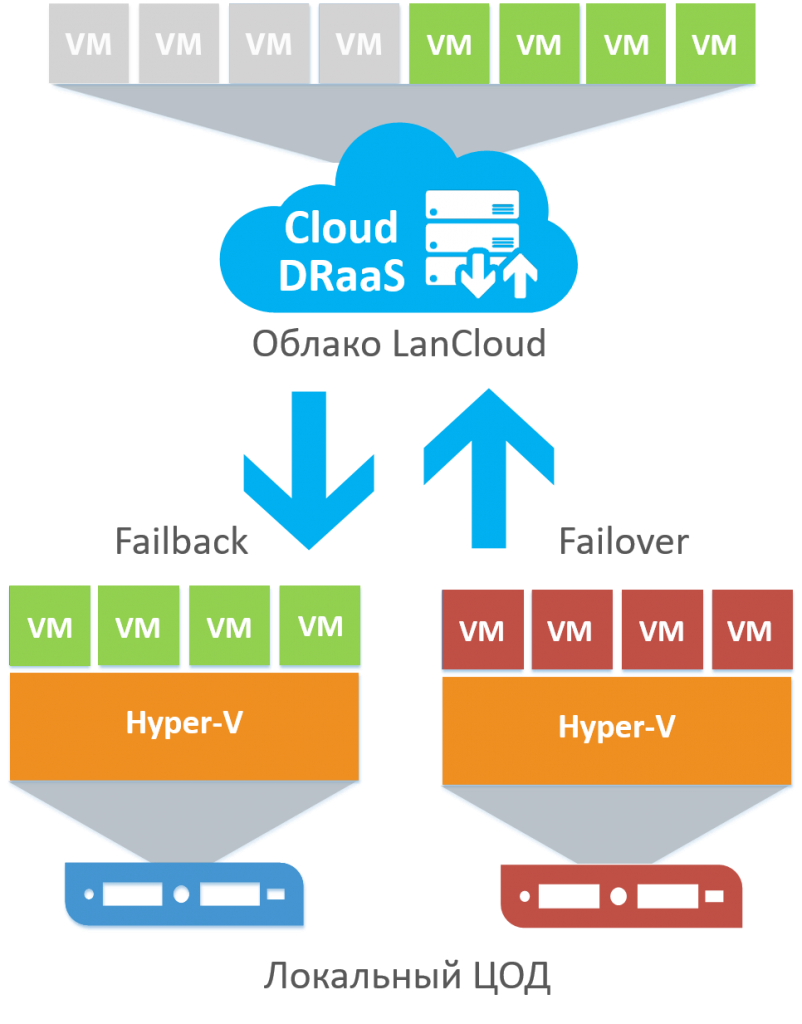
Cloud DRaaS is a cloud service for rapid disaster recovery of virtual servers in a backup LanCloud data center in the event of a partial or complete failure of the customer's primary data center. Cloud DRaaS operates through continuous asynchronous replication of all virtual servers from the customer's local data center to the LanCloud cloud data center. In the event of a local data center failure, the customer can simply enable the failover procedure with just a few clicks, and all their virtual machines are automatically launched and begin operating in the LanCloud cloud. Thus, regardless of the complexity of the failure, RTO and RPO indicators are ensured to be no more than 15 minutes.
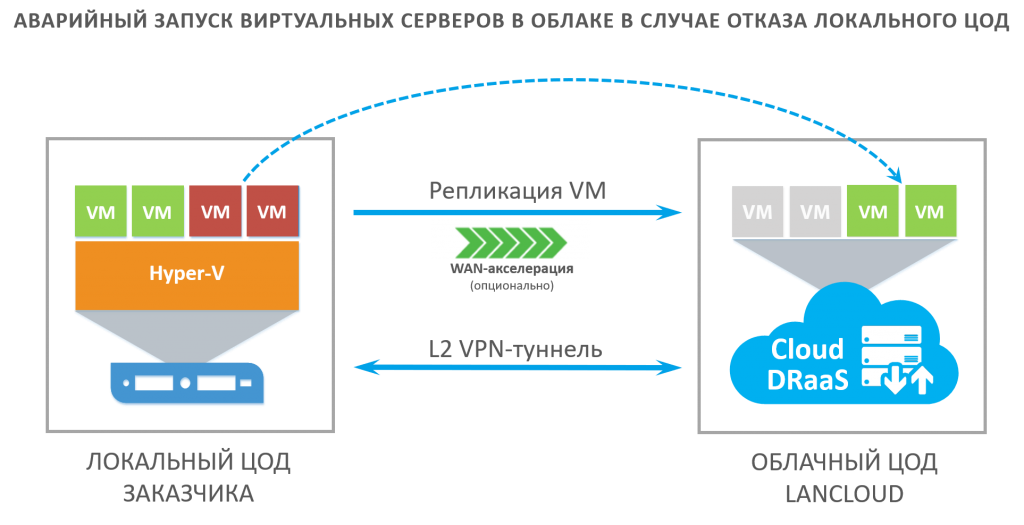
The Cloud DRaaS service is built on Veeam Backup & Replication and Veeam Cloud Connect. Veeam Backup & Replication Server is deployed in the Customer's data center, continuously synchronizing virtual machines in Veeam Cloud Connect to the LanCloud cloud. In the event of a failure, the Customer activates the failover procedure, and all virtual servers are launched in the LanCloud cloud. Veeam automatically configures an L2 VPN tunnel to the Customer's data center, allowing all servers to remain accessible over the internal network using the same IP addresses. When the primary data center is restored, the Customer can initiate the failover procedure, and all servers will be replicated back and launched in the Customer's data center.
In addition to the failover procedure, the Customer has access to the ability to restore individual files and applications from cloud replicas, similar to a standard backup. LanCloud currently supports disaster recovery for virtual servers running the Microsoft Hyper-V hypervisor.
All new customers receive a one-month free trial from LanCloud: https://lancloud.ru/oblachnye-servisy/cloud-draas/.

CLOUD
SERVICES
FOR BUSINESS
COMPANY
SERVICES
CONTACTS
Republic of Uzbekistan,
Tashkent, Mirabad district, Ming orik MFY, st. Shakhrisabz, 23.
g. Tashkent, Tashkent city, Mirabad district, Ming orik MFY, st. Shakhrisabz, 23.